> ## Documentation Index
> Fetch the complete documentation index at: https://docs.thig.ai/llms.txt
> Use this file to discover all available pages before exploring further.
# Webhooks
> Configure webhooks for real-time integrations with external services
# Webhooks
Connect thig.ai to your existing tools and workflows with webhooks. Send notifications when events occur or receive data from external services.
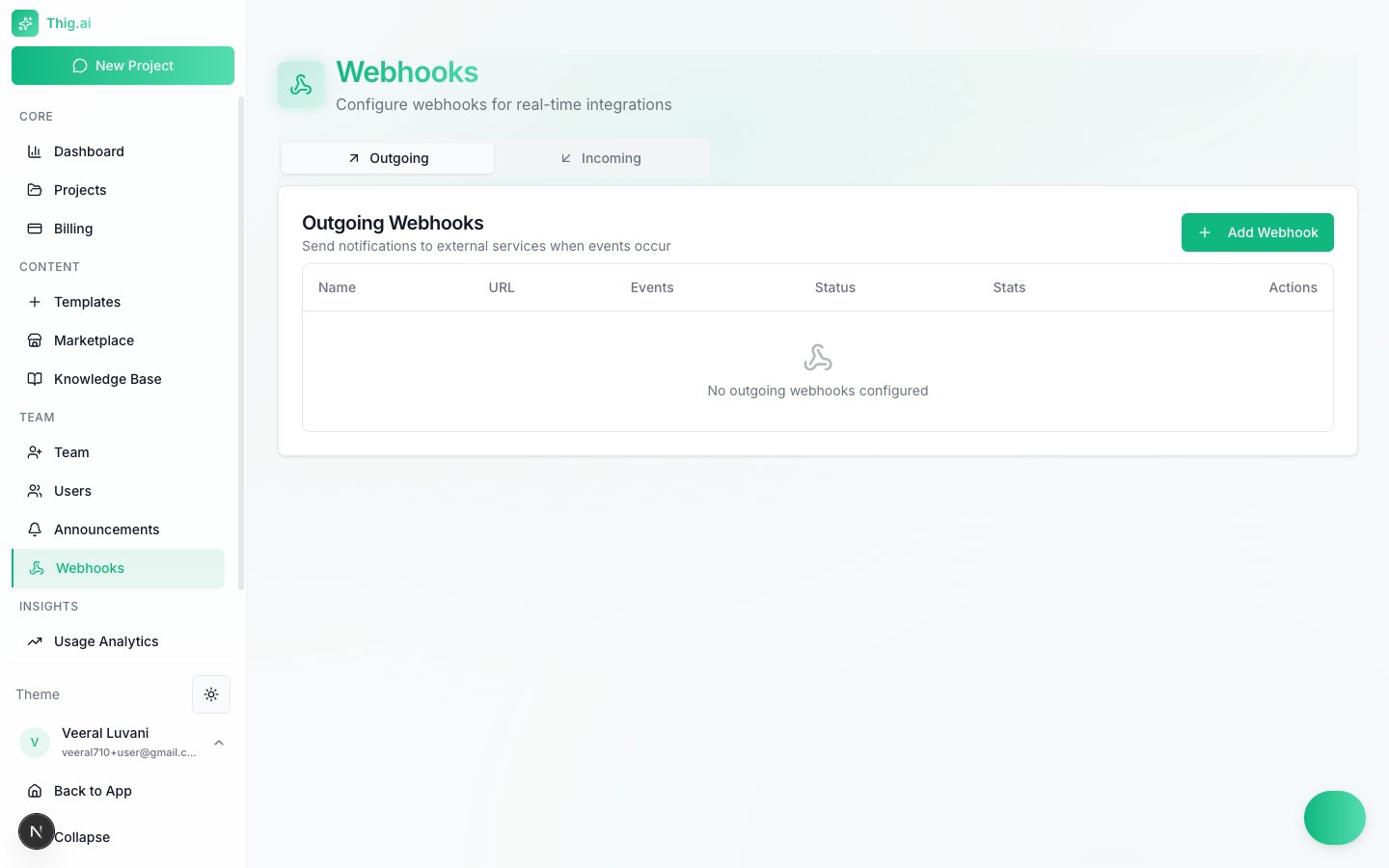 ## Outgoing Webhooks
Send HTTP POST notifications to external services whenever specific events occur in your organization.
### Creating an Outgoing Webhook
1. Go to **Webhooks** (`/admin/webhooks`) and select the **Outgoing** tab
2. Click **Add Webhook**
3. Enter a name and the destination URL
4. Select which events to listen for
5. Save the webhook
### Supported Events (40+ types)
**Project Events**
| Event | Trigger |
| ------------------------ | ---------------------------------------------------- |
| `project.created` | A new project is created |
| `project.updated` | A project's details change |
| `project.deleted` | A project is deleted |
| `project.status_changed` | A project's status changes (e.g., Draft → In Review) |
| `project.assigned` | A project is assigned to a team member |
| `project.archived` | A project is archived |
| `project.completed` | A project is marked complete |
**PRD Events**
| Event | Trigger |
| --------------------- | ---------------------------------------- |
| `prd.generated` | A PRD document is generated |
| `prd.exported` | A PRD is exported to any format |
| `prd.version_created` | A new PRD version/snapshot is saved |
| `prd.approved` | A PRD is approved via stakeholder review |
| `prd.rejected` | A PRD is rejected via stakeholder review |
**Comment Events**
| Event | Trigger |
| ------------------ | ------------------------------------ |
| `comment.created` | A comment is added to a PRD |
| `comment.resolved` | A comment thread is resolved |
| `comment.replied` | A reply is added to a comment thread |
**Team Events**
| Event | Trigger |
| -------------------------- | ----------------------------------- |
| `team.member_added` | A new member joins the organization |
| `team.member_removed` | A member is removed |
| `team.member_role_changed` | A member's role is updated |
| `team.invitation_sent` | An invitation email is sent |
| `team.invitation_accepted` | An invitation is accepted |
**AI Events**
| Event | Trigger |
| --------------------------- | ------------------------------- |
| `ai.conversation_started` | An AI chat conversation begins |
| `ai.conversation_completed` | An AI conversation finishes |
| `ai.suggestion_accepted` | A user accepts an AI suggestion |
**Billing Events**
| Event | Trigger |
| -------------------------------- | ----------------------------- |
| `billing.subscription_created` | A new subscription is created |
| `billing.subscription_updated` | A subscription plan changes |
| `billing.subscription_cancelled` | A subscription is cancelled |
| `billing.payment_failed` | A payment attempt fails |
Subscribe only to the events you need. Subscribing to fewer events reduces noise and improves webhook reliability.
### Webhook Payload
Each delivery includes a JSON body with the event type, timestamp, and relevant resource data. Headers include a signature for verification (see [Security](#webhook-security) below).
### Delivery Stats and Retries
The webhooks table shows delivery statistics for each endpoint:
* **Success rate** — Percentage of successful deliveries (2xx responses)
* **Last delivery** — Timestamp and status of the most recent attempt
* **Total deliveries** — Count of all delivery attempts
Failed deliveries are retried automatically with exponential backoff (up to 3 retries over 1 hour).
## Incoming Webhooks
Receive data from external services by generating unique webhook URLs.
### Creating an Incoming Webhook
1. Select the **Incoming** tab
2. Click **Add Webhook**
3. Name the webhook and configure the action (e.g., create a project, add a note)
4. Copy the generated URL and configure it in your external service
Each incoming webhook gets a unique URL in the format:
```
https://app.thig.ai/api/webhooks/incoming/{webhook-id}
```
## Webhook Security
All outgoing webhook deliveries are signed with HMAC-SHA256 for verification.
### Verifying Signatures
Each delivery includes these headers:
| Header | Description |
| ------------------- | ------------------------------------ |
| `webhook-id` | Unique identifier for the delivery |
| `webhook-signature` | HMAC-SHA256 signature of the payload |
| `webhook-timestamp` | Unix timestamp of the delivery |
To verify a delivery, compute the HMAC-SHA256 of the timestamp and payload body using your webhook secret, then compare it to the signature header.
Always verify webhook signatures before processing payloads. Ignoring verification exposes your endpoint to spoofed requests.
## Best Practices
* **Handle retries idempotently** — Use the `webhook-id` header to deduplicate deliveries. The same event may be delivered more than once.
* **Respond quickly** — Return a 2xx status within 10 seconds. Do heavy processing asynchronously after acknowledging receipt.
* **Monitor failures** — Check the delivery stats regularly. Webhooks with repeated failures are automatically disabled after consecutive failures.
* **Use HTTPS** — Only HTTPS endpoints are accepted for outgoing webhooks.
Test your webhook endpoint with the **Send Test** button before subscribing to real events. It sends a sample payload so you can verify your integration works.
Webhooks are available to Admin and Owner roles. Members and Viewers cannot configure webhooks.
## Outgoing Webhooks
Send HTTP POST notifications to external services whenever specific events occur in your organization.
### Creating an Outgoing Webhook
1. Go to **Webhooks** (`/admin/webhooks`) and select the **Outgoing** tab
2. Click **Add Webhook**
3. Enter a name and the destination URL
4. Select which events to listen for
5. Save the webhook
### Supported Events (40+ types)
**Project Events**
| Event | Trigger |
| ------------------------ | ---------------------------------------------------- |
| `project.created` | A new project is created |
| `project.updated` | A project's details change |
| `project.deleted` | A project is deleted |
| `project.status_changed` | A project's status changes (e.g., Draft → In Review) |
| `project.assigned` | A project is assigned to a team member |
| `project.archived` | A project is archived |
| `project.completed` | A project is marked complete |
**PRD Events**
| Event | Trigger |
| --------------------- | ---------------------------------------- |
| `prd.generated` | A PRD document is generated |
| `prd.exported` | A PRD is exported to any format |
| `prd.version_created` | A new PRD version/snapshot is saved |
| `prd.approved` | A PRD is approved via stakeholder review |
| `prd.rejected` | A PRD is rejected via stakeholder review |
**Comment Events**
| Event | Trigger |
| ------------------ | ------------------------------------ |
| `comment.created` | A comment is added to a PRD |
| `comment.resolved` | A comment thread is resolved |
| `comment.replied` | A reply is added to a comment thread |
**Team Events**
| Event | Trigger |
| -------------------------- | ----------------------------------- |
| `team.member_added` | A new member joins the organization |
| `team.member_removed` | A member is removed |
| `team.member_role_changed` | A member's role is updated |
| `team.invitation_sent` | An invitation email is sent |
| `team.invitation_accepted` | An invitation is accepted |
**AI Events**
| Event | Trigger |
| --------------------------- | ------------------------------- |
| `ai.conversation_started` | An AI chat conversation begins |
| `ai.conversation_completed` | An AI conversation finishes |
| `ai.suggestion_accepted` | A user accepts an AI suggestion |
**Billing Events**
| Event | Trigger |
| -------------------------------- | ----------------------------- |
| `billing.subscription_created` | A new subscription is created |
| `billing.subscription_updated` | A subscription plan changes |
| `billing.subscription_cancelled` | A subscription is cancelled |
| `billing.payment_failed` | A payment attempt fails |
Subscribe only to the events you need. Subscribing to fewer events reduces noise and improves webhook reliability.
### Webhook Payload
Each delivery includes a JSON body with the event type, timestamp, and relevant resource data. Headers include a signature for verification (see [Security](#webhook-security) below).
### Delivery Stats and Retries
The webhooks table shows delivery statistics for each endpoint:
* **Success rate** — Percentage of successful deliveries (2xx responses)
* **Last delivery** — Timestamp and status of the most recent attempt
* **Total deliveries** — Count of all delivery attempts
Failed deliveries are retried automatically with exponential backoff (up to 3 retries over 1 hour).
## Incoming Webhooks
Receive data from external services by generating unique webhook URLs.
### Creating an Incoming Webhook
1. Select the **Incoming** tab
2. Click **Add Webhook**
3. Name the webhook and configure the action (e.g., create a project, add a note)
4. Copy the generated URL and configure it in your external service
Each incoming webhook gets a unique URL in the format:
```
https://app.thig.ai/api/webhooks/incoming/{webhook-id}
```
## Webhook Security
All outgoing webhook deliveries are signed with HMAC-SHA256 for verification.
### Verifying Signatures
Each delivery includes these headers:
| Header | Description |
| ------------------- | ------------------------------------ |
| `webhook-id` | Unique identifier for the delivery |
| `webhook-signature` | HMAC-SHA256 signature of the payload |
| `webhook-timestamp` | Unix timestamp of the delivery |
To verify a delivery, compute the HMAC-SHA256 of the timestamp and payload body using your webhook secret, then compare it to the signature header.
Always verify webhook signatures before processing payloads. Ignoring verification exposes your endpoint to spoofed requests.
## Best Practices
* **Handle retries idempotently** — Use the `webhook-id` header to deduplicate deliveries. The same event may be delivered more than once.
* **Respond quickly** — Return a 2xx status within 10 seconds. Do heavy processing asynchronously after acknowledging receipt.
* **Monitor failures** — Check the delivery stats regularly. Webhooks with repeated failures are automatically disabled after consecutive failures.
* **Use HTTPS** — Only HTTPS endpoints are accepted for outgoing webhooks.
Test your webhook endpoint with the **Send Test** button before subscribing to real events. It sends a sample payload so you can verify your integration works.
Webhooks are available to Admin and Owner roles. Members and Viewers cannot configure webhooks.