> ## Documentation Index
> Fetch the complete documentation index at: https://docs.thig.ai/llms.txt
> Use this file to discover all available pages before exploring further.
# PRD Editor
> Edit, review, and refine your generated PRD documents
# PRD Editor
The PRD editor (`/review/[projectId]`) is a full-featured document editor with AI assistance, version history, and collaboration tools.
## Editor Layout
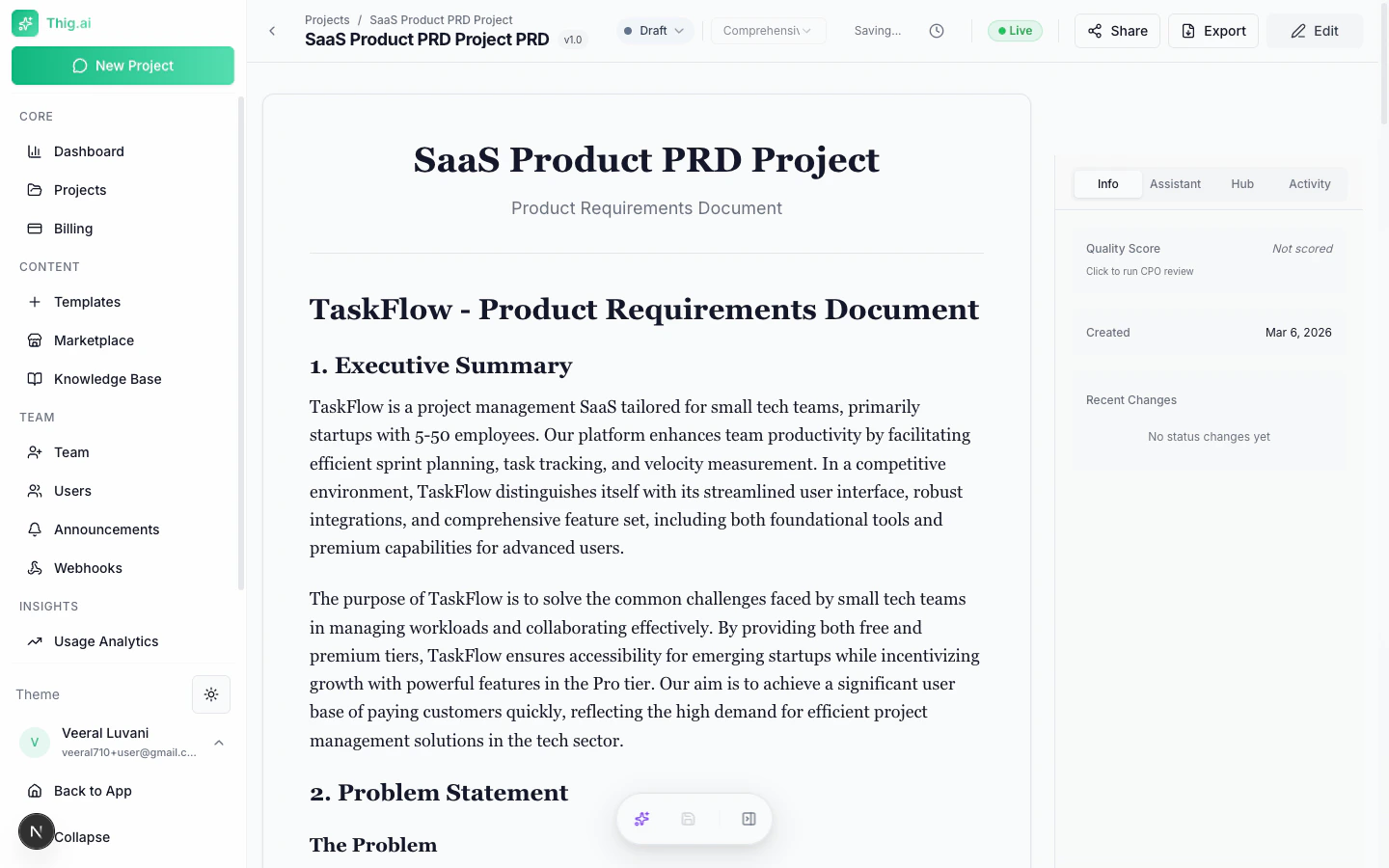 * **Document area** — Center, with the PRD content
* **Table of Contents** — Sticky sidebar (left) for quick section navigation
* **Right sidebar** — Tabbed panels for Info, Hub, Comments, Activity, and AI Coach
* **Floating Action Dock** — Bottom-center with AI assistant, Save, and sidebar toggles
## Editing
### Toggle Edit Mode
Press **E** or click the edit icon to switch between view and edit modes.
### Rich Text Features
The editor supports:
* Headings (H1–H6)
* Bold, italic, underline, strikethrough
* Bullet and numbered lists
* Tables
* Code blocks and inline code
* Images (upload or paste)
* Links
* Markdown shortcuts
### Auto-Save
Changes are automatically saved after a brief pause in typing. A "Saving..." indicator shows in the toolbar. You can also manually save with **Ctrl+Shift+S**.
## AI Writing Assistance
### Floating AI Toolbar
Select any text in the document and a toolbar appears with AI improvement options:
| Action | What It Does |
| ----------------------- | -------------------------------- |
| **Improve Writing** | Better clarity and flow |
| **Make More Concise** | Shorten while preserving meaning |
| **Add More Detail** | Expand with specifics |
| **Fix Grammar** | Correct grammar and spelling |
| **Make More Technical** | Add technical depth |
| **Simplify** | Plain language rewrite |
| **Add User Focus** | Center on user needs |
| **Add Metrics** | Add measurable success criteria |
The improved text streams in and you can apply or discard it.
### AI Suggestions Panel
Click the lightbulb icon to get proactive improvement suggestions. The AI analyzes your entire PRD and returns suggestions by section with severity levels (info, warning, important).
## PRD Coach
* **Document area** — Center, with the PRD content
* **Table of Contents** — Sticky sidebar (left) for quick section navigation
* **Right sidebar** — Tabbed panels for Info, Hub, Comments, Activity, and AI Coach
* **Floating Action Dock** — Bottom-center with AI assistant, Save, and sidebar toggles
## Editing
### Toggle Edit Mode
Press **E** or click the edit icon to switch between view and edit modes.
### Rich Text Features
The editor supports:
* Headings (H1–H6)
* Bold, italic, underline, strikethrough
* Bullet and numbered lists
* Tables
* Code blocks and inline code
* Images (upload or paste)
* Links
* Markdown shortcuts
### Auto-Save
Changes are automatically saved after a brief pause in typing. A "Saving..." indicator shows in the toolbar. You can also manually save with **Ctrl+Shift+S**.
## AI Writing Assistance
### Floating AI Toolbar
Select any text in the document and a toolbar appears with AI improvement options:
| Action | What It Does |
| ----------------------- | -------------------------------- |
| **Improve Writing** | Better clarity and flow |
| **Make More Concise** | Shorten while preserving meaning |
| **Add More Detail** | Expand with specifics |
| **Fix Grammar** | Correct grammar and spelling |
| **Make More Technical** | Add technical depth |
| **Simplify** | Plain language rewrite |
| **Add User Focus** | Center on user needs |
| **Add Metrics** | Add measurable success criteria |
The improved text streams in and you can apply or discard it.
### AI Suggestions Panel
Click the lightbulb icon to get proactive improvement suggestions. The AI analyzes your entire PRD and returns suggestions by section with severity levels (info, warning, important).
## PRD Coach
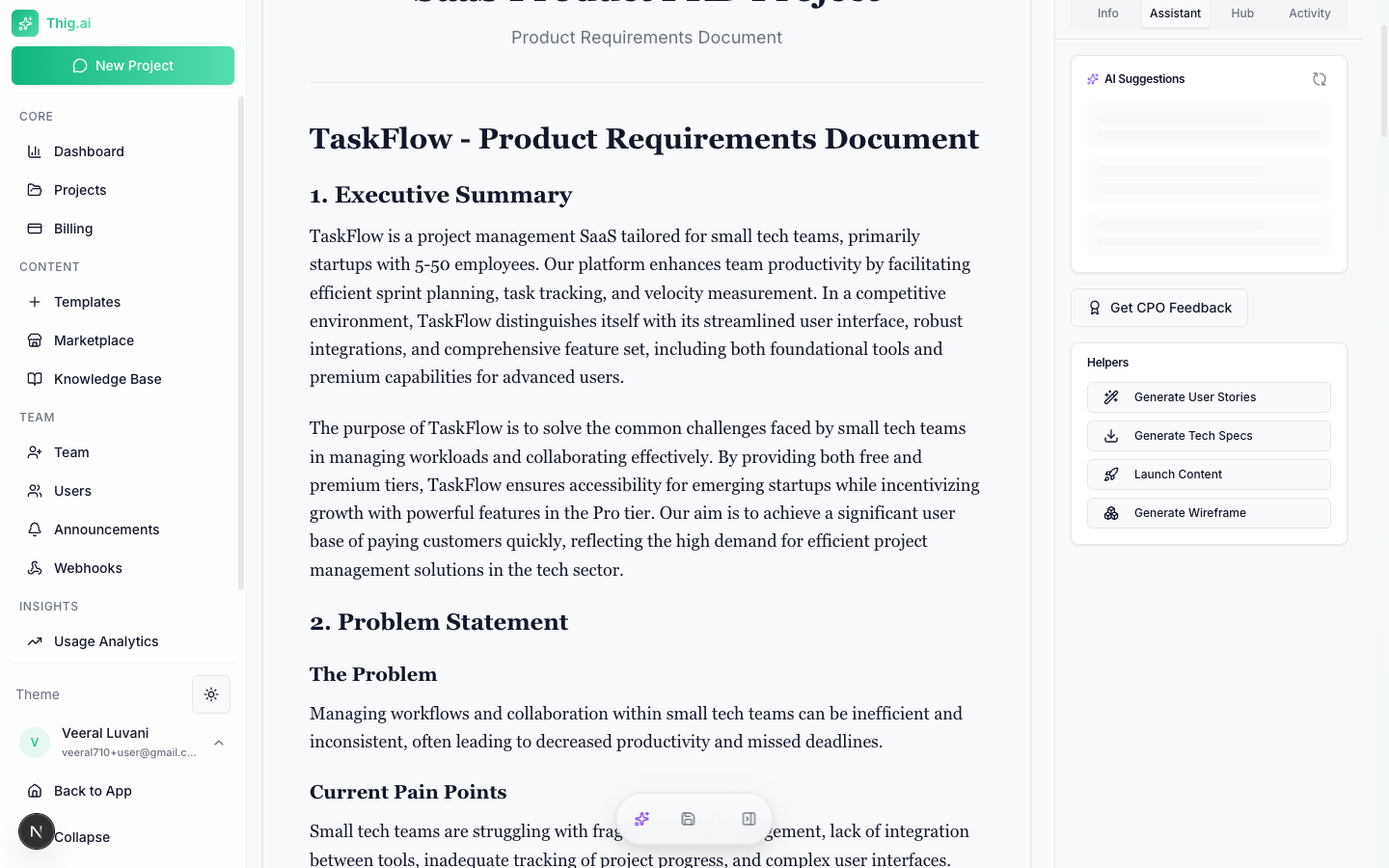 The AI Coach scores your PRD across six dimensions:
1. **Clarity** — How clear and unambiguous the document is
2. **Completeness** — Whether all essential sections are covered
3. **User Focus** — How well it centers on user needs
4. **Technical Feasibility** — Whether technical aspects are realistic
5. **Success Metrics** — Quality of measurable outcomes
6. **Risk Assessment** — How well risks are identified and mitigated
The coach provides:
* Overall score (0–100)
* Executive summary
* Strengths and improvement areas
* Missing sections
* Actionable recommendations with effort/impact analysis
* Questions for your team
## Version History
The AI Coach scores your PRD across six dimensions:
1. **Clarity** — How clear and unambiguous the document is
2. **Completeness** — Whether all essential sections are covered
3. **User Focus** — How well it centers on user needs
4. **Technical Feasibility** — Whether technical aspects are realistic
5. **Success Metrics** — Quality of measurable outcomes
6. **Risk Assessment** — How well risks are identified and mitigated
The coach provides:
* Overall score (0–100)
* Executive summary
* Strengths and improvement areas
* Missing sections
* Actionable recommendations with effort/impact analysis
* Questions for your team
## Version History
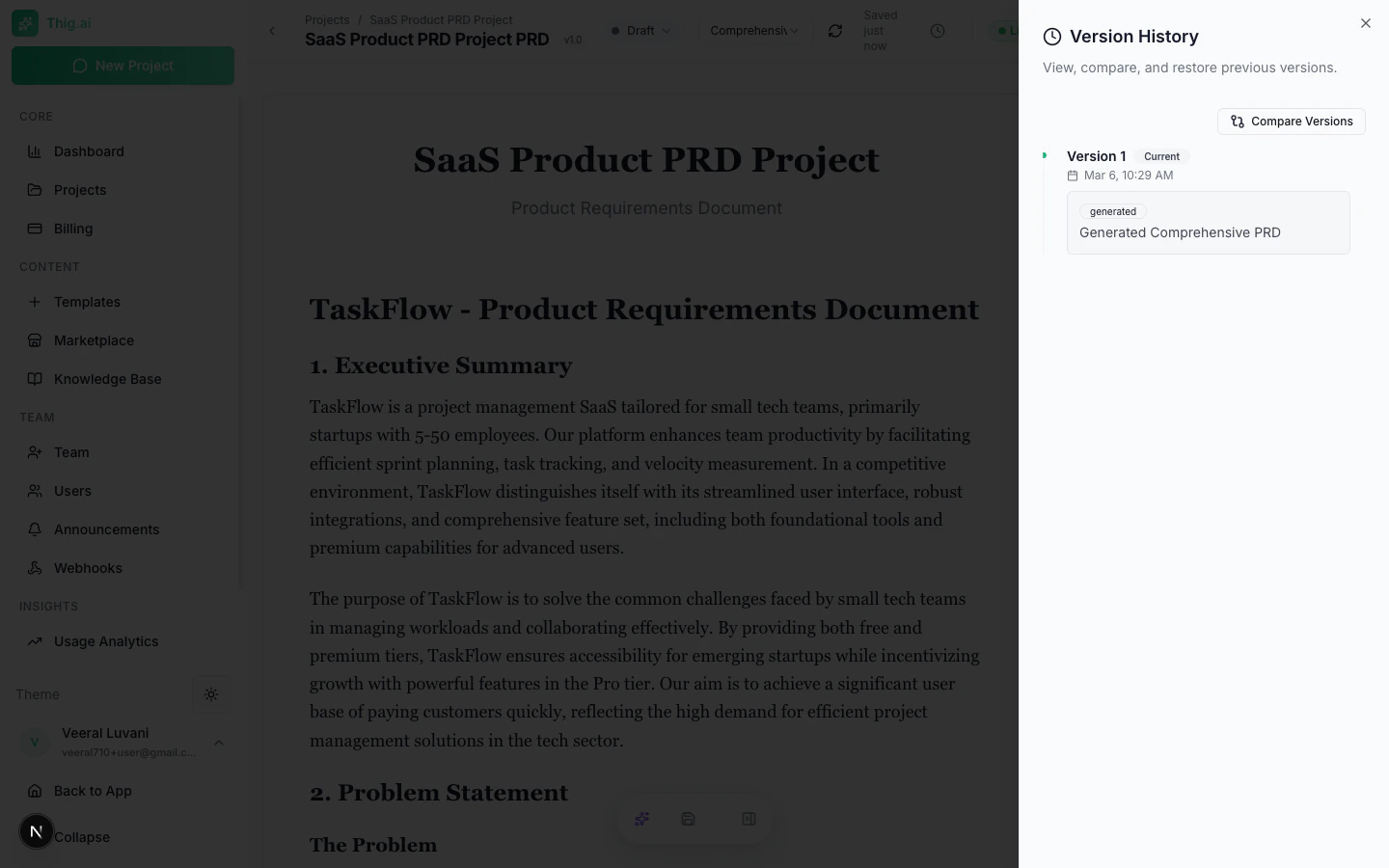 Access up to 50 versions of your PRD:
1. Click the clock icon to open the Version History sheet
2. Browse versions with timestamps, change types, and summaries
3. Click any version to preview its content
4. **Compare Mode** — Select two versions to see a side-by-side diff
5. **Restore** — Revert to any previous version (current version is auto-saved first)
The diff viewer highlights exactly what changed between versions with inline and side-by-side modes.
## Stakeholder Views
Generate perspective-tailored documents from your PRD:
### AI-Generated Documents
* **User Stories** — Sprint-ready stories with acceptance criteria
* **Technical Specs** — Architecture, APIs, database design
* **CPO Feedback** — AI acting as a Chief Product Officer
### Audience-Specific Rewrites
* **Engineering** — Technical specs and architecture
* **Design** — UX requirements and user flows
* **Executive** — Business value and ROI
* **Sales** — Value propositions and competitive advantages
* **Customer** — Benefits and getting started guide
* **Product** — User stories and sprint planning
* **QA** — Test scenarios and acceptance criteria
* **Security** — Auth, data privacy, and compliance
Each view can be generated, copied, or downloaded.
## Project Hub
The Hub tab in the right sidebar provides:
* **File manager** — Create folders, upload files, preview documents
* **Stakeholder views** — All generated perspective documents
* **Project links** — External URLs (Figma, Jira, GitHub repos, etc.)
### File Upload
* Drag and drop or click to upload
* Supported: PDF, images, text files, code files
* Max size: 10MB per file
* Files stored in Supabase Storage with signed URLs
## Additional AI Tools
### Wireframe Generator
Generate Mermaid diagrams from your PRD:
* User flows
* System architecture
* Screen layouts
* Data flow diagrams
* Sequence diagrams
* Customer journey maps
### Launch Content
Generate marketing content from your PRD:
* Blog posts
* Press releases
* Social media posts
* Email announcements
* Demo scripts
* Changelogs
### Code Spec
Generate a developer-focused specification sheet that can be copied to clipboard for use with AI coding tools.
## Keyboard Shortcuts
| Shortcut | Action |
| ------------------------------ | --------------------------------------- |
| `E` | Toggle edit mode |
| `[` | Toggle left sidebar (Table of Contents) |
| `]` | Toggle right sidebar |
| `Ctrl+Shift+S` / `Cmd+Shift+S` | Save document |
| `Cmd+K` / `Ctrl+K` | Open command palette |
| `?` | Open keyboard shortcuts |
| `Ctrl+B` / `Cmd+B` | Bold |
| `Ctrl+I` / `Cmd+I` | Italic |
| `Ctrl+U` / `Cmd+U` | Underline |
Access up to 50 versions of your PRD:
1. Click the clock icon to open the Version History sheet
2. Browse versions with timestamps, change types, and summaries
3. Click any version to preview its content
4. **Compare Mode** — Select two versions to see a side-by-side diff
5. **Restore** — Revert to any previous version (current version is auto-saved first)
The diff viewer highlights exactly what changed between versions with inline and side-by-side modes.
## Stakeholder Views
Generate perspective-tailored documents from your PRD:
### AI-Generated Documents
* **User Stories** — Sprint-ready stories with acceptance criteria
* **Technical Specs** — Architecture, APIs, database design
* **CPO Feedback** — AI acting as a Chief Product Officer
### Audience-Specific Rewrites
* **Engineering** — Technical specs and architecture
* **Design** — UX requirements and user flows
* **Executive** — Business value and ROI
* **Sales** — Value propositions and competitive advantages
* **Customer** — Benefits and getting started guide
* **Product** — User stories and sprint planning
* **QA** — Test scenarios and acceptance criteria
* **Security** — Auth, data privacy, and compliance
Each view can be generated, copied, or downloaded.
## Project Hub
The Hub tab in the right sidebar provides:
* **File manager** — Create folders, upload files, preview documents
* **Stakeholder views** — All generated perspective documents
* **Project links** — External URLs (Figma, Jira, GitHub repos, etc.)
### File Upload
* Drag and drop or click to upload
* Supported: PDF, images, text files, code files
* Max size: 10MB per file
* Files stored in Supabase Storage with signed URLs
## Additional AI Tools
### Wireframe Generator
Generate Mermaid diagrams from your PRD:
* User flows
* System architecture
* Screen layouts
* Data flow diagrams
* Sequence diagrams
* Customer journey maps
### Launch Content
Generate marketing content from your PRD:
* Blog posts
* Press releases
* Social media posts
* Email announcements
* Demo scripts
* Changelogs
### Code Spec
Generate a developer-focused specification sheet that can be copied to clipboard for use with AI coding tools.
## Keyboard Shortcuts
| Shortcut | Action |
| ------------------------------ | --------------------------------------- |
| `E` | Toggle edit mode |
| `[` | Toggle left sidebar (Table of Contents) |
| `]` | Toggle right sidebar |
| `Ctrl+Shift+S` / `Cmd+Shift+S` | Save document |
| `Cmd+K` / `Ctrl+K` | Open command palette |
| `?` | Open keyboard shortcuts |
| `Ctrl+B` / `Cmd+B` | Bold |
| `Ctrl+I` / `Cmd+I` | Italic |
| `Ctrl+U` / `Cmd+U` | Underline |