> ## Documentation Index
> Fetch the complete documentation index at: https://docs.thig.ai/llms.txt
> Use this file to discover all available pages before exploring further.
# Feature Access Control
> Control which features are available to different team roles
# Feature Access Control
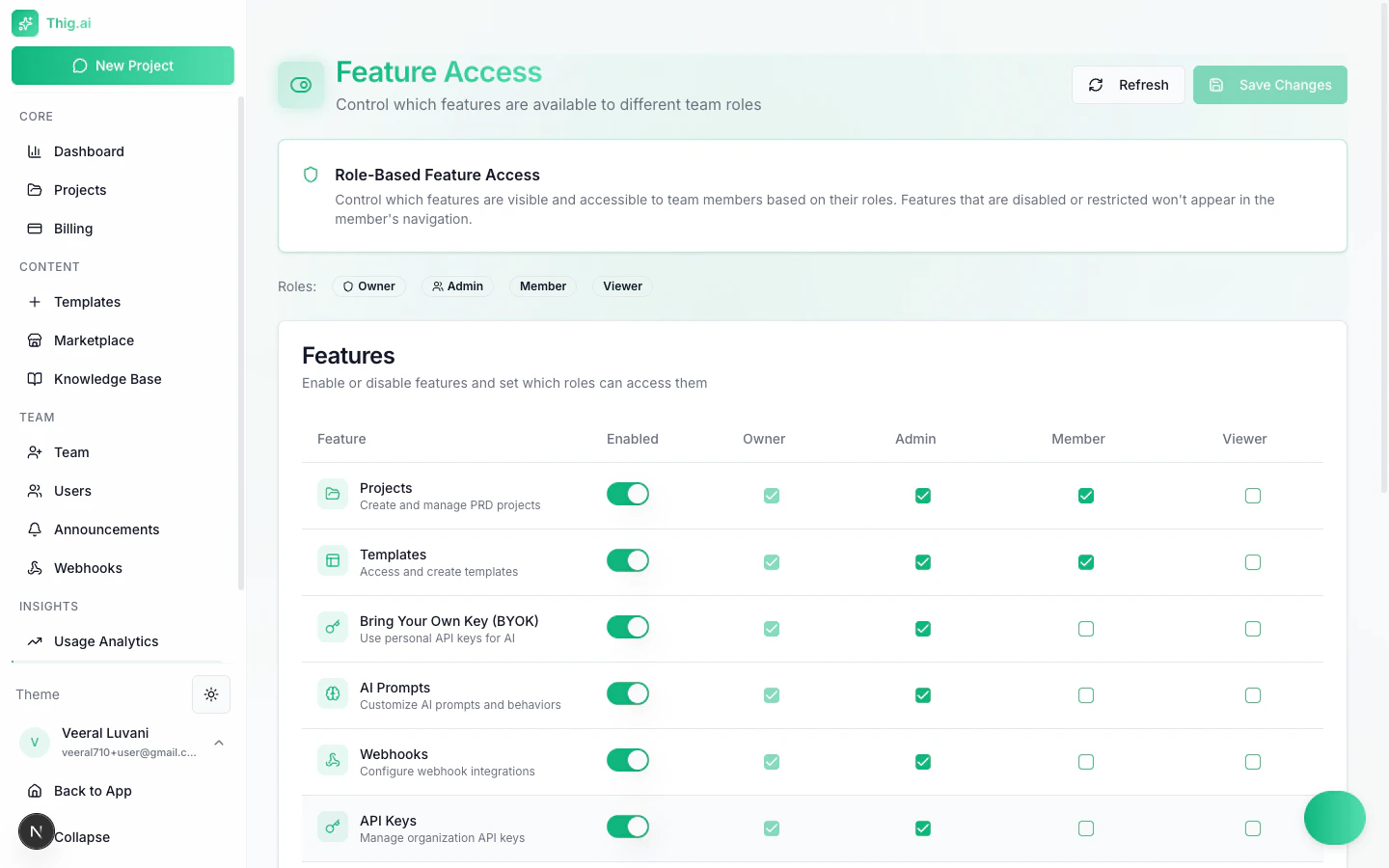
The Feature Access page (`/admin/features`) lets owners and admins control which platform features are available to each organization role. Features that are disabled or restricted will not appear in the affected member's navigation.
 ## How It Works
Each feature has two levels of control:
1. **Enabled toggle** -- Turn the feature on or off for the entire organization
2. **Role checkboxes** -- When enabled, select which roles can access it (Owner, Admin, Member, Viewer)
After making changes, click **Save Changes** to apply. Use the **Refresh** button to reload the current configuration.
## Available Features
The following 13 features can be configured:
| Feature | Description |
| ----------------------------- | ---------------------------------------------------- |
| **Projects** | Create and manage PRD projects |
| **Templates** | Access and create PRD templates |
| **Bring Your Own Key (BYOK)** | Use personal API keys for AI providers |
| **AI Prompts** | Customize AI prompts and behaviors |
| **Webhooks** | Configure webhook integrations for external systems |
| **API Keys** | Manage the organization's shared API key pool |
| **Analytics** | View usage analytics and cost tracking |
| **Export** | Export PRDs to PDF, DOCX, HTML, and other formats |
| **Custom Domain** | Configure a branded custom domain |
| **Announcements** | View team announcements and notifications |
| **Document Upload** | Upload documents to provide additional context to AI |
| **Voice Input** | Use voice recording to dictate project requirements |
| **Audio Transcription** | Transcribe audio files for use as AI context |
## Role-Based Access Matrix
By default, features are configured with sensible role assignments:
| Feature | Owner | Admin | Member | Viewer |
| ------------------- | ----- | ----- | ------ | ------ |
| Projects | Yes | Yes | Yes | -- |
| Templates | Yes | Yes | Yes | -- |
| BYOK | Yes | Yes | Yes | -- |
| AI Prompts | Yes | Yes | -- | -- |
| Webhooks | Yes | Yes | -- | -- |
| API Keys | Yes | Yes | -- | -- |
| Analytics | Yes | Yes | -- | -- |
| Export | Yes | Yes | Yes | -- |
| Custom Domain | Yes | Yes | -- | -- |
| Announcements | Yes | Yes | Yes | Yes |
| Document Upload | Yes | Yes | Yes | -- |
| Voice Input | Yes | Yes | Yes | -- |
| Audio Transcription | Yes | Yes | Yes | -- |
These are default settings. You can customize them to match your organization's needs. For example, you may want to grant Members access to Analytics or restrict Export to Admins only.
## Common Configurations
### Restrictive Setup
Limit Members to core PRD creation only:
* Enable: Projects, Templates, Export, Announcements
* Disable for Members: BYOK, AI Prompts, Webhooks, API Keys, Analytics, Custom Domain
### Open Setup
Give Members access to most features:
* Enable all features for Members except API Keys and Custom Domain
* Keep Viewer role read-only with only Announcements enabled
When onboarding new team members, start with a restrictive setup and grant additional access as needed. This prevents accidental changes to shared configurations.
Disabling a feature hides it from navigation but does not delete any existing data. Re-enabling the feature restores full access to previously created resources.
## Who Can Manage Feature Access
Only **Owners** and **Admins** can access the Feature Access page. Changes take effect immediately for all organization members.
## How It Works
Each feature has two levels of control:
1. **Enabled toggle** -- Turn the feature on or off for the entire organization
2. **Role checkboxes** -- When enabled, select which roles can access it (Owner, Admin, Member, Viewer)
After making changes, click **Save Changes** to apply. Use the **Refresh** button to reload the current configuration.
## Available Features
The following 13 features can be configured:
| Feature | Description |
| ----------------------------- | ---------------------------------------------------- |
| **Projects** | Create and manage PRD projects |
| **Templates** | Access and create PRD templates |
| **Bring Your Own Key (BYOK)** | Use personal API keys for AI providers |
| **AI Prompts** | Customize AI prompts and behaviors |
| **Webhooks** | Configure webhook integrations for external systems |
| **API Keys** | Manage the organization's shared API key pool |
| **Analytics** | View usage analytics and cost tracking |
| **Export** | Export PRDs to PDF, DOCX, HTML, and other formats |
| **Custom Domain** | Configure a branded custom domain |
| **Announcements** | View team announcements and notifications |
| **Document Upload** | Upload documents to provide additional context to AI |
| **Voice Input** | Use voice recording to dictate project requirements |
| **Audio Transcription** | Transcribe audio files for use as AI context |
## Role-Based Access Matrix
By default, features are configured with sensible role assignments:
| Feature | Owner | Admin | Member | Viewer |
| ------------------- | ----- | ----- | ------ | ------ |
| Projects | Yes | Yes | Yes | -- |
| Templates | Yes | Yes | Yes | -- |
| BYOK | Yes | Yes | Yes | -- |
| AI Prompts | Yes | Yes | -- | -- |
| Webhooks | Yes | Yes | -- | -- |
| API Keys | Yes | Yes | -- | -- |
| Analytics | Yes | Yes | -- | -- |
| Export | Yes | Yes | Yes | -- |
| Custom Domain | Yes | Yes | -- | -- |
| Announcements | Yes | Yes | Yes | Yes |
| Document Upload | Yes | Yes | Yes | -- |
| Voice Input | Yes | Yes | Yes | -- |
| Audio Transcription | Yes | Yes | Yes | -- |
These are default settings. You can customize them to match your organization's needs. For example, you may want to grant Members access to Analytics or restrict Export to Admins only.
## Common Configurations
### Restrictive Setup
Limit Members to core PRD creation only:
* Enable: Projects, Templates, Export, Announcements
* Disable for Members: BYOK, AI Prompts, Webhooks, API Keys, Analytics, Custom Domain
### Open Setup
Give Members access to most features:
* Enable all features for Members except API Keys and Custom Domain
* Keep Viewer role read-only with only Announcements enabled
When onboarding new team members, start with a restrictive setup and grant additional access as needed. This prevents accidental changes to shared configurations.
Disabling a feature hides it from navigation but does not delete any existing data. Re-enabling the feature restores full access to previously created resources.
## Who Can Manage Feature Access
Only **Owners** and **Admins** can access the Feature Access page. Changes take effect immediately for all organization members.