> ## Documentation Index
> Fetch the complete documentation index at: https://docs.thig.ai/llms.txt
> Use this file to discover all available pages before exploring further.
# AI Tools
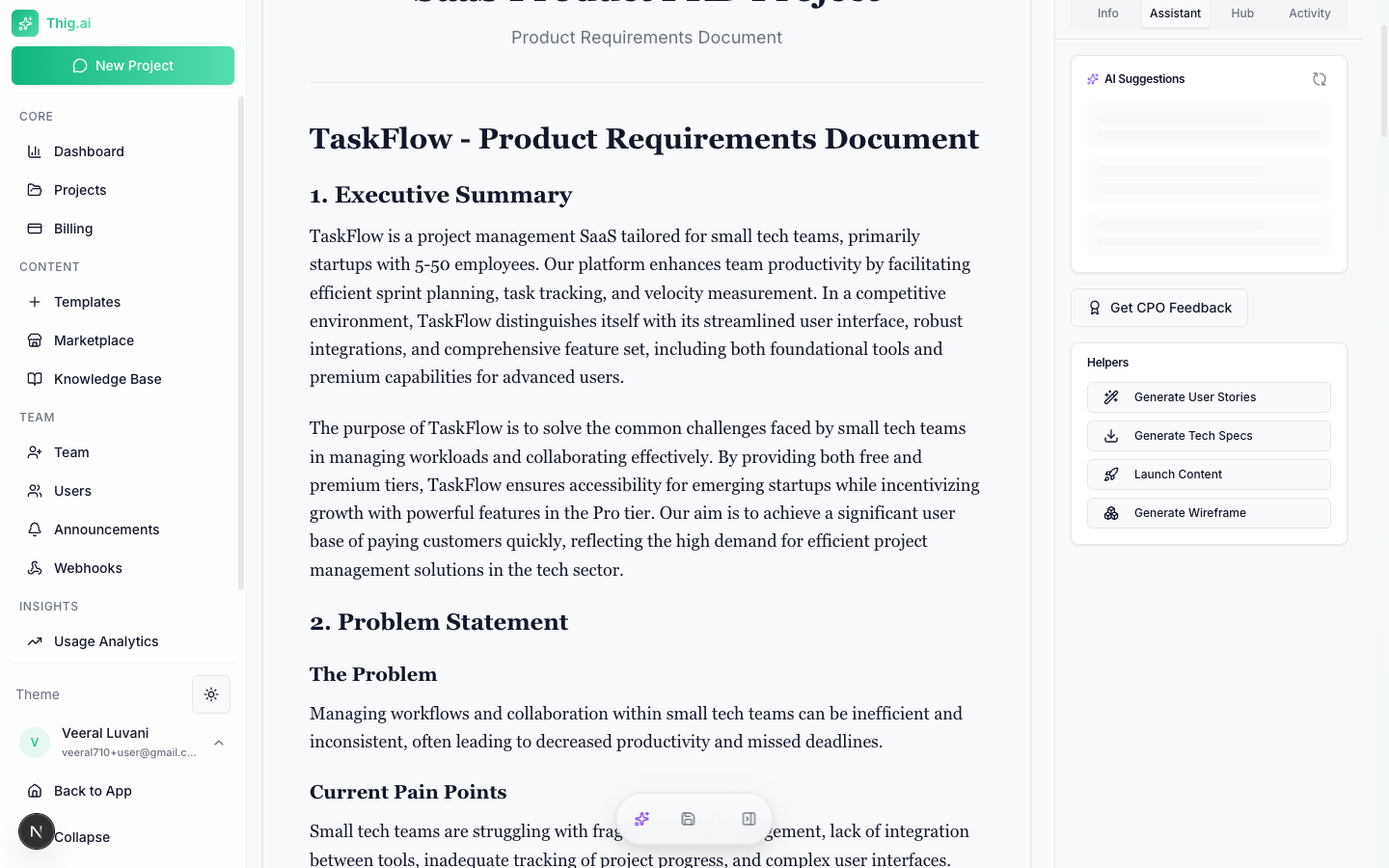
> Generate user stories, technical specs, roadmaps, wireframes, and more from your PRD
# AI Tools
thig.ai includes a suite of AI-powered tools that generate derivative documents from your PRD. All tools are accessible from the PRD review page.
### Which tool should I use?
| Need | Tool | Best For |
| ------------------------- | -------------------------- | ------------------------------------------------------ |
| Quality review of my PRD | **PRD Coach** | Getting a score and actionable feedback before sharing |
| Refining specific text | **AI Improvements** | Polishing paragraphs, fixing grammar, adjusting tone |
| Sprint-ready stories | **User Stories** | Handing off to engineering with acceptance criteria |
| Architecture & API docs | **Technical Specs** | Developer handoff and system design |
| Phased project plan | **Implementation Roadmap** | Planning timelines, milestones, and dependencies |
| Visual diagrams | **Wireframe Generator** | User flows, architecture diagrams, journey maps |
| Marketing copy | **Launch Content** | Blog posts, press releases, social media, emails |
| AI coding assistant input | **Code Spec** | Condensed spec sheet for Cursor, Copilot, etc. |
## PRD Coach
 Get an AI-powered quality review of your PRD.
**Scored dimensions:**
* Clarity (0–100)
* Completeness (0–100)
* User Focus (0–100)
* Technical Feasibility (0–100)
* Success Metrics (0–100)
* Risk Assessment (0–100)
**Output includes:**
* Overall quality score
* Executive summary
* Strengths list
* Prioritized improvement items (high/medium/low)
* Missing sections (critical/important/nice-to-have)
* Recommendations with effort/impact analysis
* Questions for your team
Overall Score: 74/100
Clarity: 82/100 - Requirements are well-defined with minor ambiguities in the notification system section.
Completeness: 68/100 - Missing detailed error handling, offline behavior, and accessibility requirements.
User Focus: 80/100 - Strong user personas but success metrics could tie more directly to user outcomes.
Technical Feasibility: 75/100 - Architecture is sound. Consider adding capacity estimates for the real-time sync feature.
Success Metrics: 60/100 - KPIs are defined but lack baseline values and measurement methodology.
Risk Assessment: 70/100 - Key risks identified. Add mitigation strategies for third-party API dependencies.
Top Recommendations:
* Add error states and fallback behavior for each feature (effort: low, impact: high)
* Define baseline metrics and measurement plan for each KPI (effort: medium, impact: high)
* Include accessibility requirements per WCAG 2.1 AA (effort: medium, impact: medium)
## User Stories
Generate sprint-ready user stories with acceptance criteria from your PRD.
**Input sources:**
* Full PRD content
* Specific features
* Requirements sections
**Output:** Structured user stories in "As a \[user], I want to \[action], so that \[benefit]" format with detailed acceptance criteria.
Stories are automatically saved to the project's Stakeholder Views and Knowledge Base.
## Technical Specs
Generate a comprehensive technical specification from your PRD.
**Includes:**
* System architecture
* API design
* Database schema
* Technology recommendations
* Infrastructure requirements
* Security considerations
You can optionally specify focus areas for deeper analysis. Saved to Stakeholder Views and Knowledge Base.
## Implementation Roadmap
Generate a phased implementation plan from your PRD.
**Configuration:**
* **Team size**: Small (1–3), Medium (4–8), Large (9+)
* **Methodology**: Agile, Waterfall, or Hybrid
**Output:** Phase-by-phase breakdown with milestones, dependencies, and timeline estimates.
## Wireframe Generator
Generate Mermaid diagrams from your PRD:
| Diagram Type | What It Shows |
| ----------------------- | ---------------------------------------- |
| **User Flow** | Step-by-step user navigation paths |
| **System Architecture** | Components and their relationships |
| **Screen Layout** | Page structure and element placement |
| **Data Flow** | How data moves through the system |
| **Sequence Diagram** | Interaction sequences between components |
| **Journey Map** | Customer experience across touchpoints |
You can generate diagrams for the full PRD or specific sections. Diagrams render inline with the Mermaid viewer.
## Code Spec
Generate a developer-focused specification sheet:
* Condensed technical summary
* Copy-to-clipboard for use with AI coding tools (Cursor, Copilot, etc.)
* Saved to Knowledge Base
## Launch Content
Generate marketing and launch content from your PRD:
| Content Type | What's Generated |
| ---------------------- | ---------------------------- |
| **Blog Post** | Product announcement article |
| **Press Release** | Formal press release |
| **Social Media** | Platform-specific posts |
| **Email Announcement** | Launch email copy |
| **Demo Script** | Product demo talking points |
| **Changelog** | Version release notes |
## AI Writing Improvements
Select any text in the PRD editor to access inline AI improvements:
* **Improve Writing** — Better clarity and flow
* **Make More Concise** — Shorten while preserving meaning
* **Add More Detail** — Expand with specifics
* **Fix Grammar** — Correct errors
* **Make More Technical** — Add technical depth
* **Simplify** — Plain language rewrite
* **Add User Focus** — Center on user needs
* **Add Metrics** — Add measurable criteria
## AI Suggestions
The AI proactively analyzes your PRD and surfaces suggestions:
* Missing sections that should be added
* Sections that need more detail
* Inconsistencies between sections
* Opportunities to strengthen the document
Suggestions are categorized by severity: info, warning, and important.
Get an AI-powered quality review of your PRD.
**Scored dimensions:**
* Clarity (0–100)
* Completeness (0–100)
* User Focus (0–100)
* Technical Feasibility (0–100)
* Success Metrics (0–100)
* Risk Assessment (0–100)
**Output includes:**
* Overall quality score
* Executive summary
* Strengths list
* Prioritized improvement items (high/medium/low)
* Missing sections (critical/important/nice-to-have)
* Recommendations with effort/impact analysis
* Questions for your team
Overall Score: 74/100
Clarity: 82/100 - Requirements are well-defined with minor ambiguities in the notification system section.
Completeness: 68/100 - Missing detailed error handling, offline behavior, and accessibility requirements.
User Focus: 80/100 - Strong user personas but success metrics could tie more directly to user outcomes.
Technical Feasibility: 75/100 - Architecture is sound. Consider adding capacity estimates for the real-time sync feature.
Success Metrics: 60/100 - KPIs are defined but lack baseline values and measurement methodology.
Risk Assessment: 70/100 - Key risks identified. Add mitigation strategies for third-party API dependencies.
Top Recommendations:
* Add error states and fallback behavior for each feature (effort: low, impact: high)
* Define baseline metrics and measurement plan for each KPI (effort: medium, impact: high)
* Include accessibility requirements per WCAG 2.1 AA (effort: medium, impact: medium)
## User Stories
Generate sprint-ready user stories with acceptance criteria from your PRD.
**Input sources:**
* Full PRD content
* Specific features
* Requirements sections
**Output:** Structured user stories in "As a \[user], I want to \[action], so that \[benefit]" format with detailed acceptance criteria.
Stories are automatically saved to the project's Stakeholder Views and Knowledge Base.
## Technical Specs
Generate a comprehensive technical specification from your PRD.
**Includes:**
* System architecture
* API design
* Database schema
* Technology recommendations
* Infrastructure requirements
* Security considerations
You can optionally specify focus areas for deeper analysis. Saved to Stakeholder Views and Knowledge Base.
## Implementation Roadmap
Generate a phased implementation plan from your PRD.
**Configuration:**
* **Team size**: Small (1–3), Medium (4–8), Large (9+)
* **Methodology**: Agile, Waterfall, or Hybrid
**Output:** Phase-by-phase breakdown with milestones, dependencies, and timeline estimates.
## Wireframe Generator
Generate Mermaid diagrams from your PRD:
| Diagram Type | What It Shows |
| ----------------------- | ---------------------------------------- |
| **User Flow** | Step-by-step user navigation paths |
| **System Architecture** | Components and their relationships |
| **Screen Layout** | Page structure and element placement |
| **Data Flow** | How data moves through the system |
| **Sequence Diagram** | Interaction sequences between components |
| **Journey Map** | Customer experience across touchpoints |
You can generate diagrams for the full PRD or specific sections. Diagrams render inline with the Mermaid viewer.
## Code Spec
Generate a developer-focused specification sheet:
* Condensed technical summary
* Copy-to-clipboard for use with AI coding tools (Cursor, Copilot, etc.)
* Saved to Knowledge Base
## Launch Content
Generate marketing and launch content from your PRD:
| Content Type | What's Generated |
| ---------------------- | ---------------------------- |
| **Blog Post** | Product announcement article |
| **Press Release** | Formal press release |
| **Social Media** | Platform-specific posts |
| **Email Announcement** | Launch email copy |
| **Demo Script** | Product demo talking points |
| **Changelog** | Version release notes |
## AI Writing Improvements
Select any text in the PRD editor to access inline AI improvements:
* **Improve Writing** — Better clarity and flow
* **Make More Concise** — Shorten while preserving meaning
* **Add More Detail** — Expand with specifics
* **Fix Grammar** — Correct errors
* **Make More Technical** — Add technical depth
* **Simplify** — Plain language rewrite
* **Add User Focus** — Center on user needs
* **Add Metrics** — Add measurable criteria
## AI Suggestions
The AI proactively analyzes your PRD and surfaces suggestions:
* Missing sections that should be added
* Sections that need more detail
* Inconsistencies between sections
* Opportunities to strengthen the document
Suggestions are categorized by severity: info, warning, and important.